vim setup problem
Verfasst: Mittwoch 4. Mai 2011, 12:15
Hi,
Ich habe diese Seite gefunden ( http://blog.dispatched.ch/2009/05/24/vim-as-python-ide/ ) und habe diese Befehle ausgefuehrt unter Fedora 14:
Leider bin ich nicht in der Lage dieses Popup zu bekommen http://blog.dispatched.ch/wp-content/up ... letion.png.
Wie bekommt man dieses Popup?
Vielen Dank im Vorraus.
Ich habe diese Seite gefunden ( http://blog.dispatched.ch/2009/05/24/vim-as-python-ide/ ) und habe diese Befehle ausgefuehrt unter Fedora 14:
Code: Alles auswählen
:python print "hello, world" into VIM

mkdir -p ~/.vim/plugin

http://www.vim.org/scripts/script.php?script_id=159
mv minibufexpl.vim ~/.vim/plugin
vim  ~/.vimrc
let g:miniBufExplMapWindowNavVim = 1
let g:miniBufExplMapWindowNavArrows = 1
let g:miniBufExplMapCTabSwitchBufs = 1
let g:miniBufExplModSelTarget = 1

sudo yum install ctags
http://vim.sourceforge.net/scripts/script.php?script_id=273

unzip taglist_45.zip
mv plugin ~/.vim/
mv doc ~/.vim
$ which ctags
/usr/bin/ctags
vim  ~/.vimrc
let Tlist_Ctags_Cmd='/usr/bin/ctags'
:TlistToggle into VIM

http://www.vim.org/scripts/script.php?script_id=2607 (does not work)
mv tasklist.vim ~/.vim/plugin

vim  ~/.vimrc
map T :TaskList<CR>
map P :TlistToggle<CR>

http://www.vim.org/scripts/script.php?script_id=1542 (does not work)
mkdir -p ~/.vim/autoload/
mv pythoncomplete.vim ~/.vim/autoload/
vim  ~/.vimrc
autocmd FileType python
set omnifunc=pythoncomplete#Complete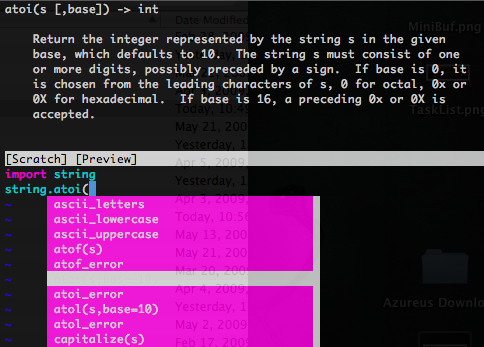
Wie bekommt man dieses Popup?
Vielen Dank im Vorraus.